Every Document Reviewed Before It Goes Out
Structured review process with feedback, automatic finalization, and a complete audit trail. Know exactly who reviewed what, when, and what they decided.
Quality control built into your workflow
A junior lawyer finishes drafting a contractor agreement. Before it goes to the client, they submit it for review. The senior lawyer sees it in their review queue, opens it, and notices the non-compete clause is too restrictive. They click "Request Changes" and add specific feedback.
The junior lawyer sees the feedback, reopens the document, makes the correction, and resubmits. This time the senior lawyer approves, and the document is finalized automatically: tracked changes accepted, ready to send.
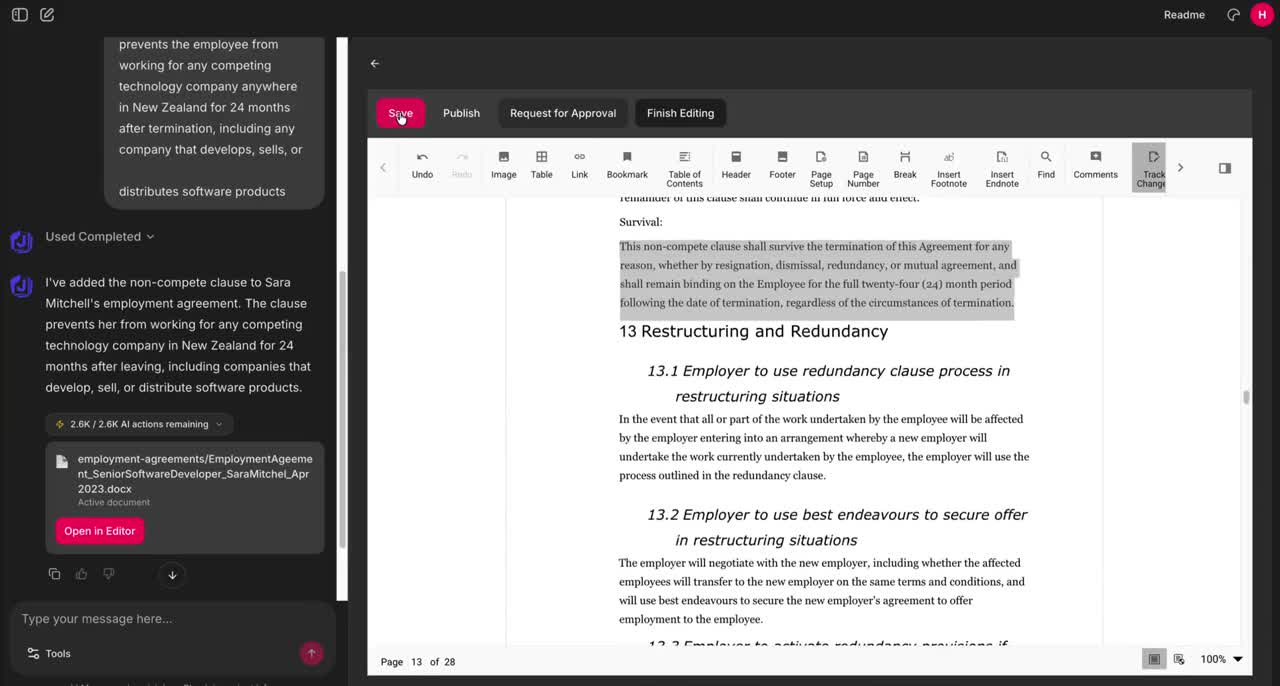
The Approval Process
Submit
Author submits document for review. Document lock is released automatically.
Review
Reviewer opens the document and examines the content, tracked changes, and compliance status.
Decide
Approve the document or request changes with specific feedback for the author.
Finalize
On approval, tracked changes are accepted and the document is published automatically.
Permanent Audit Trail
Every action is recorded: who submitted, who reviewed, what decision was made, when it happened. Kept forever and exportable to CSV for SIEM and compliance reviews.
Custom Roles & Per-File Access
Build roles that match your firm's structure (paralegals, associates, partners) and add per-user overrides or per-file restrictions for sensitive matters. The AI inherits the same access as the user.
Clean Ownership, Seamless Hand-Off
One draft per document, shared across the team. Whoever opens it next picks up where the last person left off. Reviewers always see a stable version. Submitting for approval releases the editing session automatically.
Approvals are one piece of the platform
Pair structured reviews with role-based access and a permanent audit trail. The timeline shows every decision, not just the final outcome.
Add Structure to Your Document Reviews
Set up approval workflows for your team in minutes.
Book a demoEvery demo includes a free 14-day guided pilot for your team. No credit card required.