The legal document platform.
AI inside, control around it.
One workspace for the entire life of every document: search, draft, review, restrict, and audit, all from one place.
Every demo includes a free 14-day guided pilot for your team. No credit card required.
Built for legal teams
Whether you're a law firm, in-house counsel, or HR department, Juravie fits your workflow.
Law firms
Search the firm's precedent library in seconds. Manage matters with custom roles per practice. Restrict partner-only files. Run every AI action through Compliance Guard before edits land.
In-house legal
Standardize templates across departments. When a regulation changes, find every affected agreement in seconds. The Sessions Dashboard gives you a permanent audit trail for compliance reviews.
HR teams
Generate employment agreements from templates for every new hire. Compliance Guard catches labor-law issues before edits are applied, with NZ, AU, and US rules built in. Route through manager approval before sending to the employee.
Enterprise-grade security for legal documents
Your legal documents deserve the highest level of protection.
AES-256 Encryption
Data encrypted at rest and in transit
Per-tenant isolation
Dedicated database per organization
No AI training
Your data is never used to train models
SOC 2 aligned
Security practices follow SOC 2 principles
Three pillars. One workspace.
Most AI tools edit a document. Juravie governs the entire lifecycle of every document in your firm.
Manage the library
A file manager built for legal, with folders that mirror your templates, metadata-aware search by party or address, and a Details pane that surfaces type and key facts at a glance.
Explore the file managerGovern who sees what
Custom roles per organization, per-user permission overrides, and per-file restrictions for sensitive matters. The AI inherits exactly the user's access — never more.
See access managementRun every edit safely
A Compliance Pre-Check before every AI action, tracked changes for every author, structured approvals, and a permanent timeline of who did what, visible to admins in real time.
See sessions & auditA platform — not just an AI tool
Single-document AI tools edit one file at a time and stop there. Juravie governs everything around the AI: the library, the roles, the restrictions, the audit, and the compliance check before every action.
Single-document AI tools
- One document at a time, no library
- Answers limited to the file you paste; no cross-document citations
- No role model, no per-file restrictions
- AI sees whatever you paste, with no access boundary
- No compliance check before edits land
- No structured approvals, no audit trail
Juravie
- Full file manager with metadata search (party, address, document type)
- Ask plain-English questions across every document, with citations
- Custom roles, per-user overrides, per-file restrictions
- AI inherits exactly the user's access — never more
- Compliance Pre-Check on every AI action: citation, risk level, alternative
- Sessions dashboard + permanent timeline + CSV export
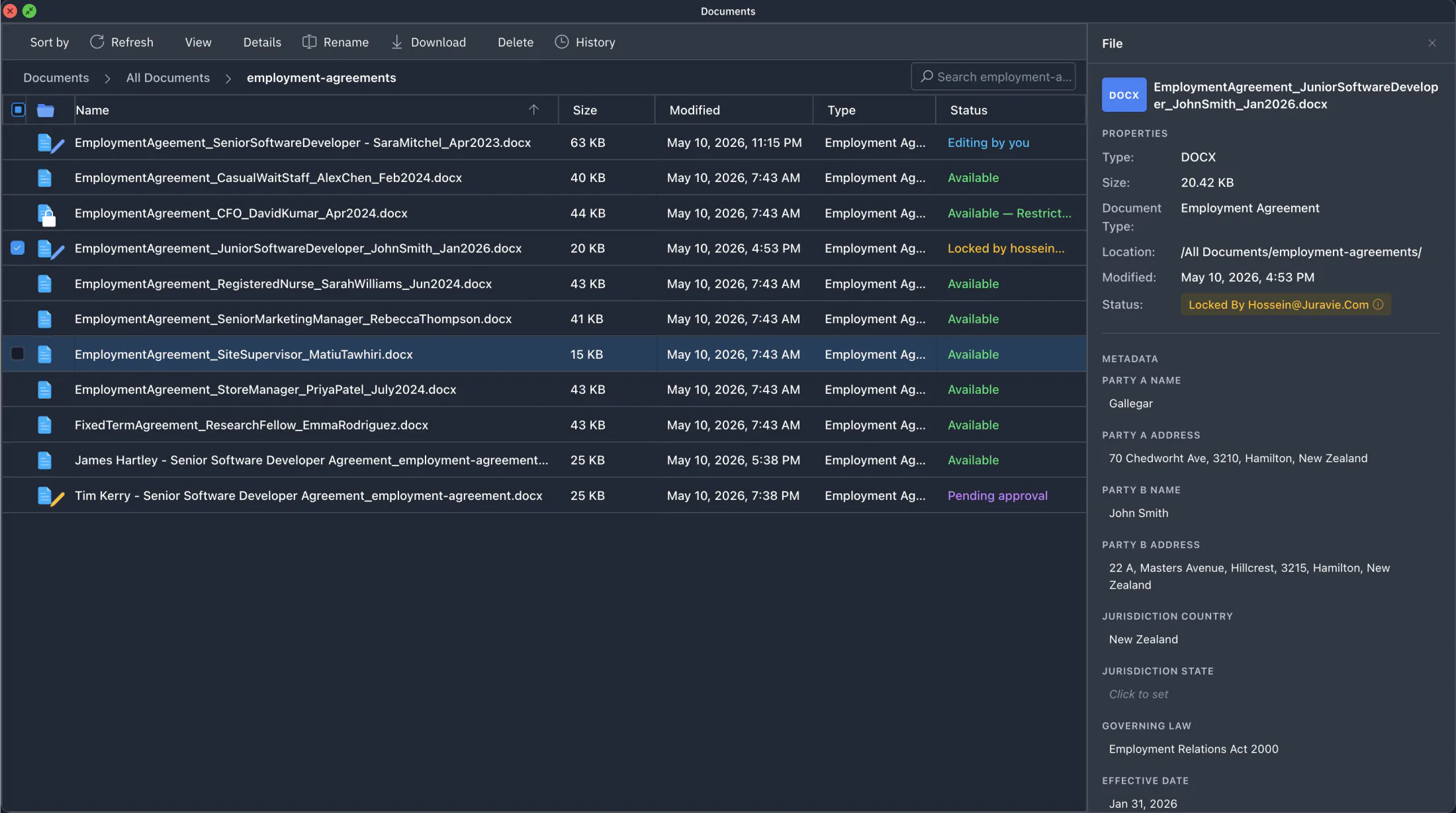
A file manager built for legal, not for "any document"
Folders mirror your templates one-to-one, so new documents land in the right place automatically. The Details pane surfaces what matters — parties, jurisdiction, governing law, status — without opening the file.
Search your entire library in plain English
A new regulation changes the minimum notice period. Instead of opening every contract one by one, you ask: “Which of our employment agreements have a notice period under 30 days?” In seconds, you get a list with citations to the exact clauses, across hundreds of documents.
Every answer carries the documents and clauses it came from. Click any citation and the document opens to that exact paragraph — highlighted, ready to read in context. When a partner says “show me where that came from,” you’re there in two seconds.
- Plain-English questions across every document
- Citations to the exact clause; click to jump to the highlighted paragraph
- Search by party name or address, not just filename
Every result respects your role and per-file restrictions. The AI never references files you can't see.
Two ways to build a template. One way to scale.
Upload your best document, or describe what you need from scratch. Either way, AI proposes the placeholders and structure — you review, save, and every new document built from that template lands in the right folder, in your firm's standard language.
Upload an existing document
AI reads your DOCX and proposes placeholders for the variable fields. You review and save.
Generate from scratch with AI
Describe the document — type, parties, jurisdiction — and AI proposes an outline you customize before saving.
Folder structure mirrors All Documents — new files from any template land in the right place. Every template action is permission-checked and recorded in the audit trail.
Roles for the rule. Overrides for the edge case.
Build custom roles that match your firm's structure — paralegals, associates, partners, contract attorneys. When one person needs to bypass the rule for one matter, grant or revoke that single permission for that single user. The role model stays clean.
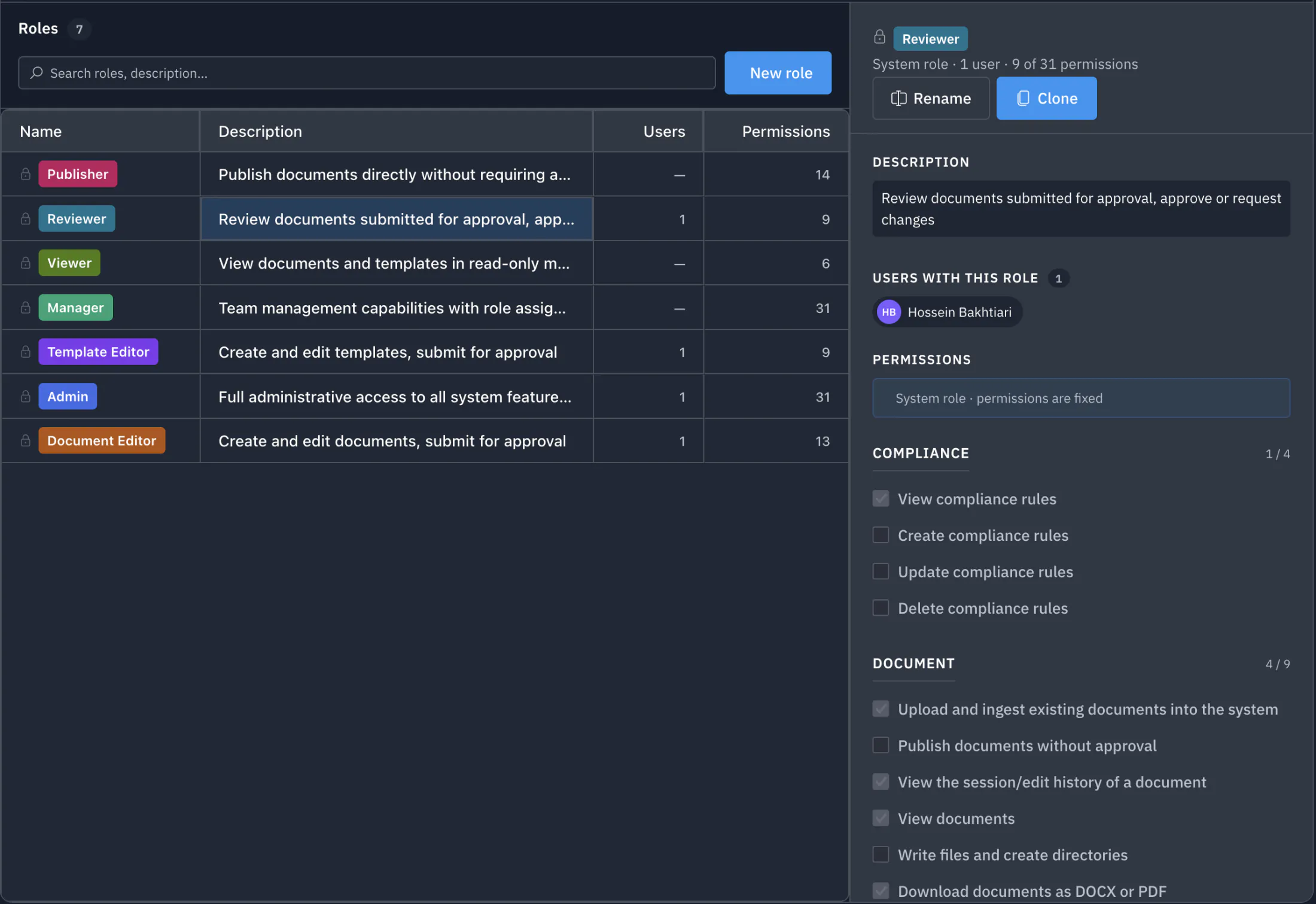
Custom roles
Clone a system template, rename, and tune the permissions to match the seat. Roles get colour-coded cards visible to admins and to the user themselves.
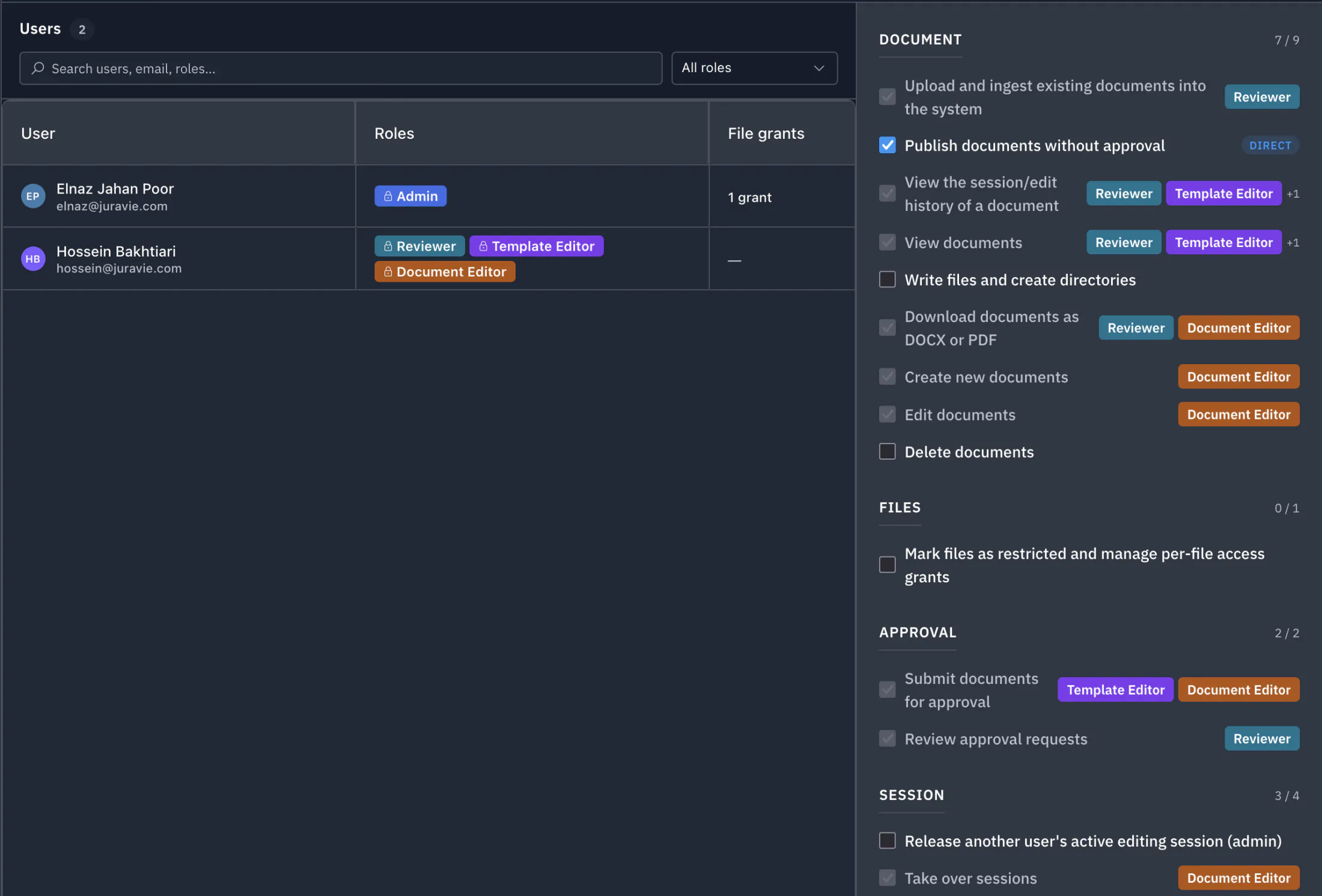
Per-user overrides
Grant or revoke a single permission for a single user without breaking the role model. Effective permissions are role + overrides; every change recorded by who and when.
Lock down a single file. The AI obeys the same boundary.
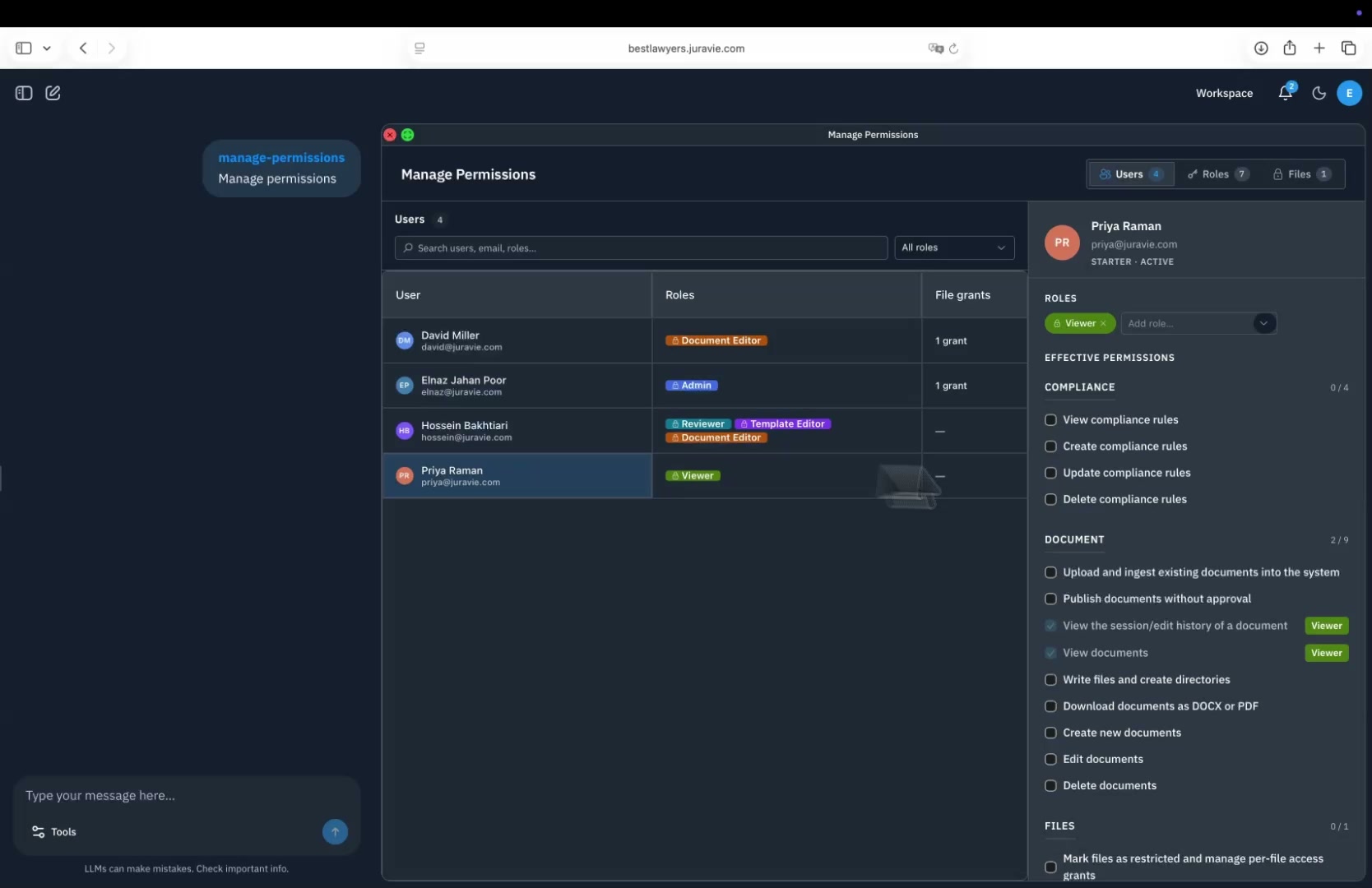
Three lawyers. Same question. Different answers — because the AI only sees what each person is allowed to see. Restrict any file to a named subset of users with four independent access modes (View, Download, Edit, Delete). Restricted files are completely hidden from everyone else, including the AI for those users.
- Per-file, not per-folder — granular by design
- Four access modes per user, set independently
- AI inherits the user's permission — no “admin override” for the AI
Every edit tracked. Every author named.
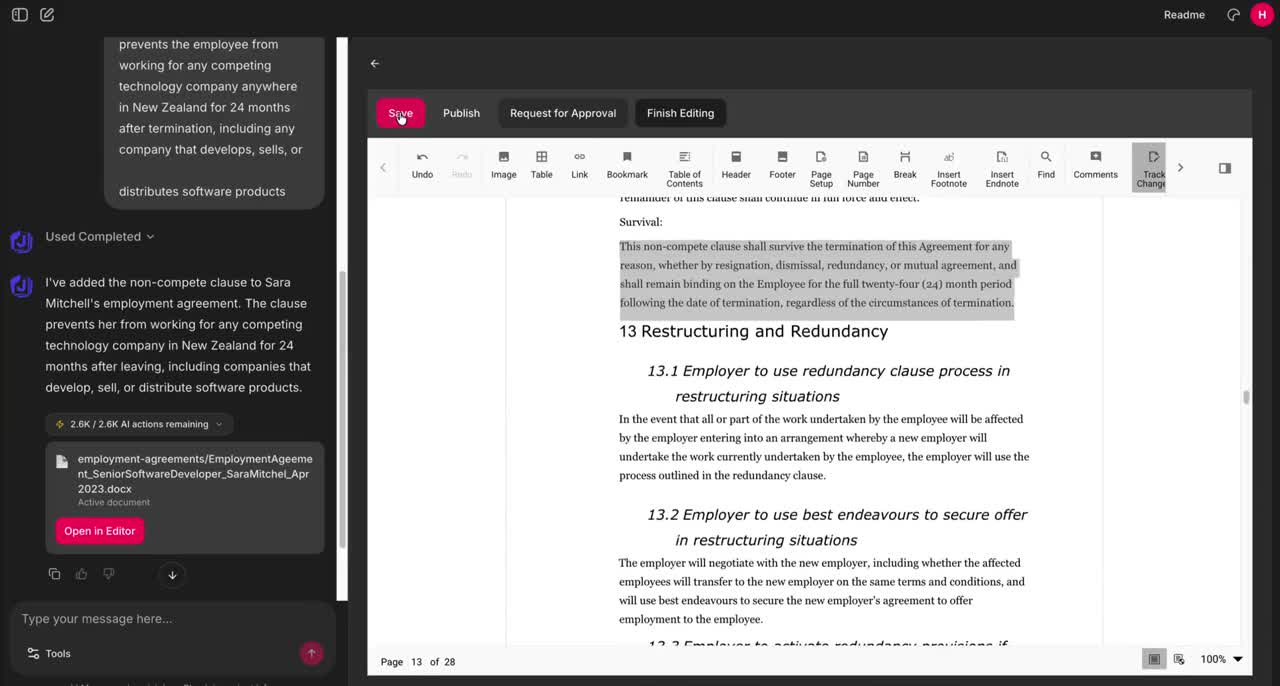
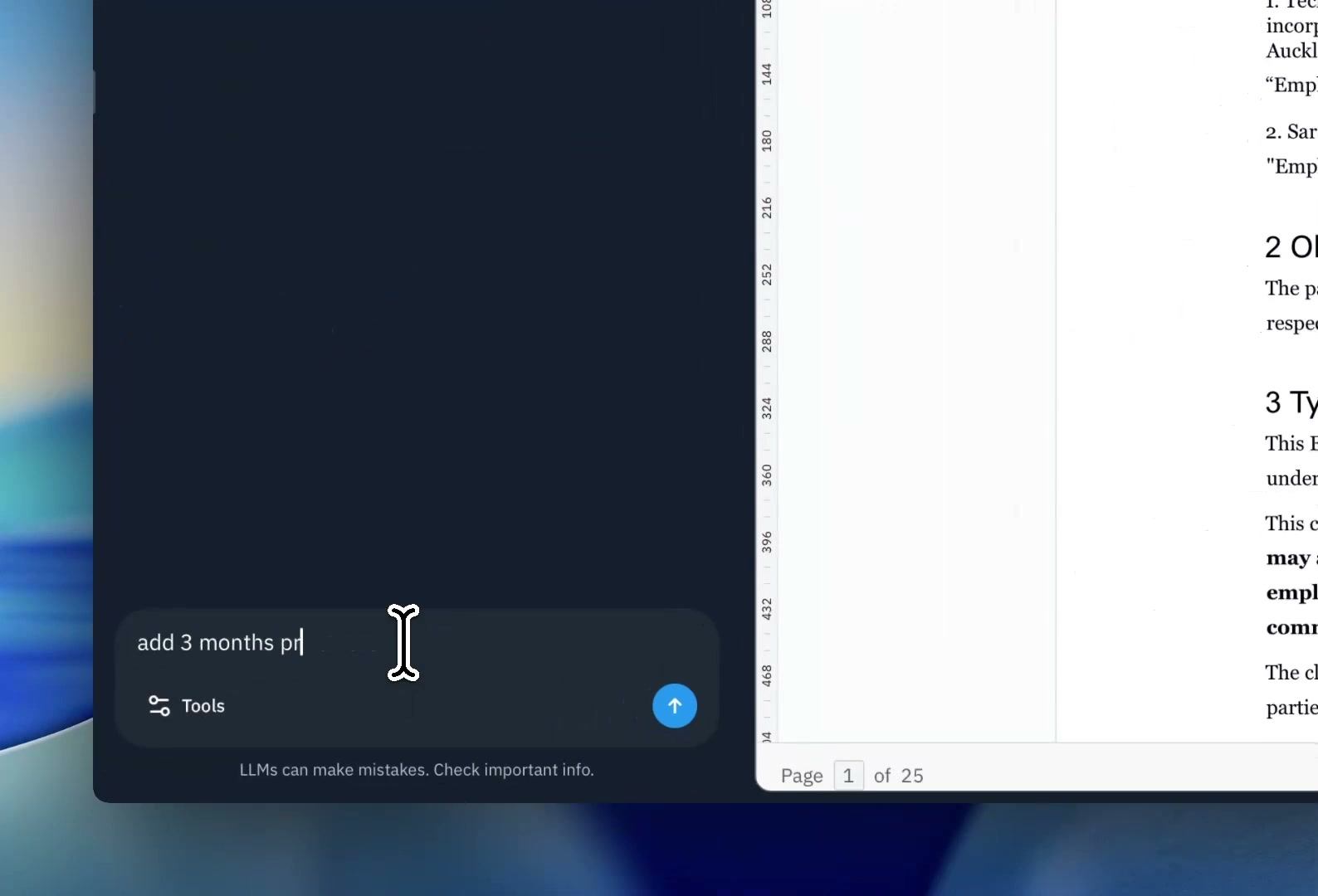
Type "Change salary to 145000$ and add 3 months probation period." The AI finds the right clauses, makes the edits, and shows them as tracked changes: strikethrough for deletions, highlights for additions. Accept or reject each change individually. The AI never accepts its own changes.
- Plain-English edit instructions
- Per-line accept or reject, separate from document approval
- Tracked even with track-changes "off" in the toolbar
Every redline is recorded permanently in the file's history, with author and timestamp.
A pre-check before every AI action — not a setting
Before any AI-driven document change is applied, Compliance Guard checks the request against the document's jurisdiction and document type. You see what's safe, what isn't, and exactly which statute is at risk. Then you decide what to do.
What Compliance Guard surfaces for every issue
Worked example: "Reduce the notice period to 7 days."
| Field | Example |
|---|---|
| Area | Notice Period |
| Statute | Employment Relations Act 2000, s.67 |
| Risk level | High — illegal / void Medium — likely unenforceable |
| Issue | A 7-day notice period falls below the statutory minimum for this employment type and jurisdiction. |
| Suggested alternative | Use 14 days minimum for fixed-term roles, or align with the role-specific minimum in this jurisdiction. |
You always get three options — never blocked, always informed:
Proceed anyway
Apply the change as requested. Decision recorded in the audit trail.
Apply only the safe parts
Compliant portions of your request go through; risky portions are skipped.
Cancel
Discard the change entirely.
Structured reviews, with everything recorded
A junior lawyer drafts a contractor agreement and submits for review. The senior lawyer redlines, clicks Request Changes with feedback, the author resubmits, the senior approves, and the document auto-publishes and re-indexes for firm-wide search.
- Approve, Request Changes, or Reject — every decision recorded
- Two layers of accept: by the line, by the document
- Auto-publish on Approve, re-indexed for search
Every session. Every change. Kept forever.
A live command center for editing in flight, plus a permanent timeline you can slice by document, person, or period. Every state transition recorded — started, paused, handed off, approved, rejected, published. Filter the period, switch between timeline and table view, export to CSV for your SIEM or compliance review.
- 10+ event types, every state transition captured
- Drill by document, by user, by period — same UI, four scopes
- CSV export for SIEM, audit, or quarterly compliance review
Triage stuck work in seconds without losing a draft. Release returns the document; Discard throws the draft away — both confirmation-gated.
Built for legal review, not for typing in the same paragraph
One draft per document, shared by the team. Whoever opens it next picks up where the last person left off, with every change attributed, every hand-off recorded, and a reviewer always seeing a stable version.
Real-time co-authoring is great for shared brainstorming. For legal review — where attribution, stable versions, and a clean audit chain matter — sequential ownership wins. You step away; your draft is preserved. A colleague continues from your last keystroke. The reviewer sees a stable version, decides, and the audit chain stays intact.
- One draft per document, shared across the team
- Every change attributed to one author with one timestamp
- Hand-offs recorded permanently, visible in the Sessions Dashboard
- Reviewers always see a stable draft, never a moving target
Two front doors. One product.
Power users live in the chat. Everyone else lives in the Workspace, a permission-aware tile menu that only shows what you're allowed to use. Same product underneath. Same permissions. Same audit trail.
Chat for power users
Slash commands (/my-reviews, /sessions-dashboard, /templates), natural-language questions, and AI-driven document edits. Anything you can do in the Workspace, you can do faster in chat.
- Plain-English commands and questions
- Slash commands map 1-to-1 to Workspace tiles
Workspace for everyone else
A familiar tile menu. New features show up automatically. You only see what you're allowed to use. Admins see admin tiles; reviewers see review queues; viewers see only what they can read.
- Permission-aware: never a button you can't click
- Workspace ↔ Chat: two front doors to the same product
Ask the product how to use it. No training deck required.
Stuck on how to restrict a file or set up an approval workflow? Ask the AI in chat. The help system knows what features your role can use, what your firm has configured, and walks you through the exact steps for your seat — not a generic FAQ.
Onboarding a new associate takes hours, not days. New features ship and the help system already knows them.
- Answers ground in your firm's actual roles, permissions, and setup
- Step-by-step walkthroughs that reflect what you can do today
- Available in the chat and on every Workspace tile
From first look to firm-wide, in four steps
We set everything up for you. Your firm's only job is to show up and try it on real work.
Book a demo
A 30-minute walkthrough on realistic sample documents matched to your practice. Nothing of your own to prepare or share.
We set up your team
Send us names, emails, and roles. We create every account and configure access to match your firm. Nobody at your end installs or configures anything.
Run a 14-day guided pilot
Your team uses Juravie on realistic work, with us alongside: a live kickoff, a mid-pilot check-in, and help whenever someone is stuck. Free, no credit card.
Get a quote for your firm
After the pilot, you receive a written quote priced for your team, in your local currency. Accept online and your team keeps working without interruption.
Frequently asked questions
Is my data secure?
Yes. Every organization gets a dedicated, isolated database with AES-256 encryption. Your data is never shared with other customers or used to train AI models. We follow SOC 2 security principles.
Can two lawyers edit the same document at the same time?
Not character-by-character — that's the wrong primitive for legal work. Juravie uses a hand-off model: one editor at a time, drafts shared across the team, every change attributed. When you step away, your colleague continues from your last keystroke. Reviewers always see a stable version, and every hand-off is recorded permanently.
Can I create my own roles?
Yes. Build custom roles to match your firm's structure: paralegals, associates, partners, contract attorneys. Add per-user permission overrides for one-off exceptions, and per-file restrictions for sensitive matters. Every action visible in the product respects the user's role and grants.
How do you stop the AI from leaking confidential files?
The AI inherits exactly the access of the user. If a user can't see a file, neither can the AI for that user. View-only grants → AI can read; edit grants → AI can edit; no grant → AI can't reference the file at all. Two users get different answers from the same chat based on their own access.
What stops the AI from making a legally risky edit?
Compliance Guard. Before every AI action that modifies a document, Juravie runs a pre-check against the document's jurisdiction and document type. If a change would breach a statute, you see the exact citation, a risk level (illegal/void or likely unenforceable), and a compliant alternative. You then choose: proceed anyway, apply only the safe parts, or cancel.
Can I use my existing documents?
Yes. Upload your existing DOCX files and Juravie indexes them for AI-powered search. You can also convert your best documents into reusable templates.
How is Juravie different from a Word add-in?
Word add-ins edit one document at a time. Juravie governs the entire lifecycle of every document: file manager built for legal, custom roles and per-file restrictions, sessions dashboard, compliance pre-check before every AI action, structured approvals, and a permanent audit trail. AI inside, control around it.
How long does it take to get started?
Book a demo and we handle the rest. We create every account, set up roles to match your firm, and have your team ready before the pilot kicks off. Nobody at your end installs or configures anything. Once you're in, the Workspace tile menu surfaces every feature you have access to, and the built-in AI help walks any user through the steps for their role.
How much does Juravie cost?
Pricing is tailored to each firm: your seats, your usage levels, and your local currency (AUD, NZD, or USD). Book a demo, run the free 14-day guided pilot with your team, and you'll receive a written quote priced for your firm. No credit card is needed for the demo or the pilot.
Ready to put governance around your AI?
Join legal teams who manage their entire document library — search, draft, review, restrict, and audit — from one workspace.
Questions? Email [email protected]